
Get Dada Mail Now
- Dada Mail
- Free!
- Get started with Dada Mail! Transform your install into Pro Dada later
- No Support
- Limitations: up to three mailing lists; 100 subscribers per mailing list
- No access to Pro Dada Manual
- Pro Dada, One-Year Subscription
- $150 for one year
- Get access to Pro Dada, the Dada Mail Manual, and direct, prioritized support
- Direct, Prioritized Support
- Unlimited Mailing Lists + Subscribers
- Access to Pro Dada Manual (view online/download PDF)
- Pro Dada, Forever Subscription
- $300 one-time for life-time
- Get access to Pro Dada, the Dada Mail Manual, and direct, prioritized support, for the Life of the Project! (15+ years and counting)
- Direct, Prioritized Support
- Unlimited Mailing Lists + Subscribers
- Access to Pro Dada Manual (view online/download PDF)
See our Pro Dada/Dada Mail Manual Purchasing FAQ/T.O.S. before purchasing!
Current Pro Dada Subscribers
Log into your Pro Dada Subscriber area to download Pro Dada, View/Download the Pro Dada Manual, or Open up a Support Ticket:
Prioritized, Direct Support
Pro Dada Subscribers received Prioritized, Direct Support from us for one installation of Pro Dada, through Zendesk. Support by us is only available to Pro Dada Subscribers.
Pro Dada also does not have List Quotas (Dada Mail: three mailing lists) or Subscription Quotas (Dada Mail: 5,000 subscribers per mailing list) by default.
Pro Dada also comes with the Dada Mail Manual. The Dada Mail Manual can be viewed online, as well as a PDF download.
Feature |
Dada Mail |
Pro Dada: |
Pro Dada: |
| Prioritized Support | NO SUPPORT | Zendesk | Zendesk |
| Subscription Quota Per Mailing List | 100 | Unlimited! | Unlimited! |
| Mailing List quota per installation | 3 | Unlimited! | Unlimited! |
| Visible Link back to support site in all emails sent by the program. | Yes. | None. | None. |
| Visible Links back to support site in most HTML screens created by the program | Yes. | None. | None. |
| Visible Links in generated subscription form created by program | Yes. | None. | None. |
| Access to Pro Dada | No. | Yes! One Year! | Yes! Lifetime! |
| Access to Dada Mail Manual (Lifetime) | No. | Yes! One Year! | Yes! Lifetime! |
The Dada Mail Manual
The Dada Mail Manual is a user guide for Dada Mail: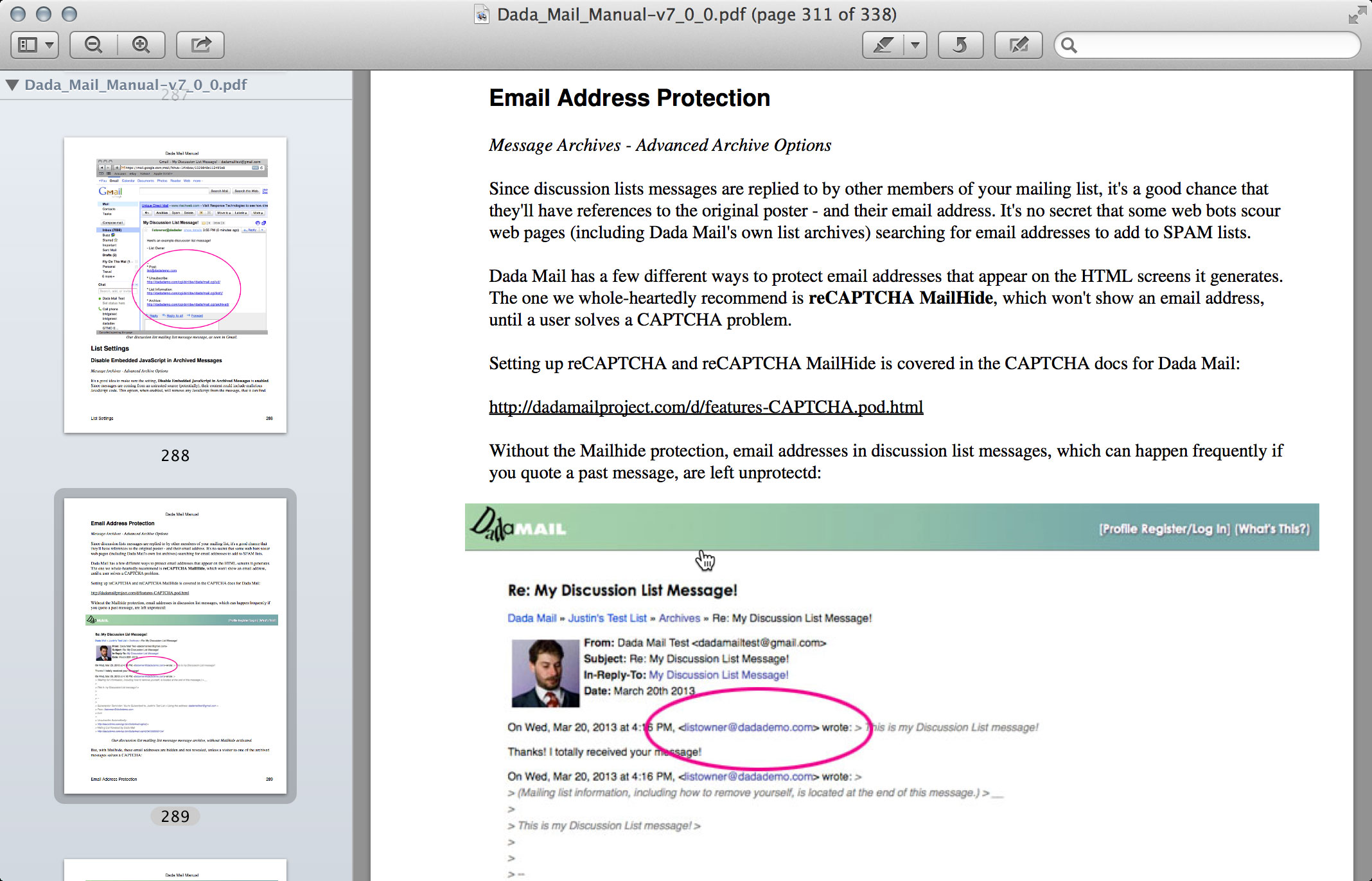
Screenshot of the, "Dada Mail Manual" PDF download
The Dada Mail Manual covers installing Dada Mail and its plugins/extensions, upgrading, creating a new mailing list, the email templating system and almost every list control panel screen. Over 300 pages, 20 chapters and 100+ screenshots. Chapters for the list control panel screens can be accessed easily from within Pro Dada and read online:
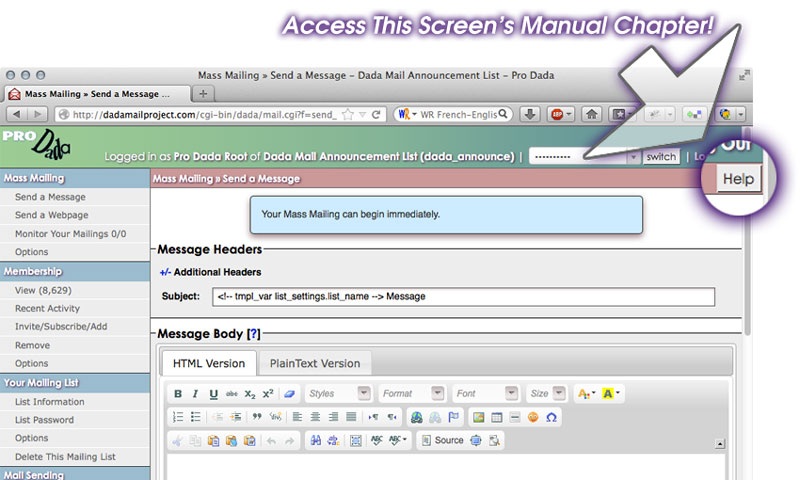
Access the Dada Mail Manual right from your mailing list's control panel
Table of Contents of the Dada Mail Manual:
Dada Mail!
-
Dada Mail Manual
-
Create a New List
-
Advice on Using Dada Mail
Installing Dada Mail
-
Install Dada Mail
-
Advanced Configuration with the Dada Mail Installer
-
Install Dada Mail, Command Line Interface
Upgrading Dada Mail
-
How to Upgrade Dada Mail
-
Install - Upgrade FAQ
List Control Panel Screens
-
Mass Mailing: Send a Message
-
Mass Mailing: Send a Webpage
-
Mass Mailing: Drafts/Stationery/Schedules
-
Mass Mailing: Monitor Your Mailings
-
Mass Mailing: Options
-
Membership: View
-
Membership: Recent Activity
-
Membership: Edit Membership
-
Membership: Invite/Subscribe/Add
-
Membership: Remove
-
Membership: Options
-
Your Mailing List: List Information
-
Your Mailing List: Change List Password
-
Your Mailing List: Options
-
Your Mailing List : Web Services API
-
Your Mailing List: Delete This Mailing List
-
Sending: Options
-
Sending: Advanced Options
-
Sending: Mass Mailing Options
-
Message Archives: View
-
Message Archives: Options
-
Message Archives: Advanced Options
-
Appearance and Templates: Your Mailing List Template
-
Appearance and Templates: Email Message Templates
-
Appearance and Templates: HTML Screen Templates
-
Appearance and Templates: Subscription Form HTML
-
Appearance and Templates: Create a Back Link
-
Profiles: Profile Fields
-
Your List Control Panel : Customize Feature Set
-
Your List Control Panel: Options
-
App Information: Configuration
-
App Information: Scheduled Jobs
Advanced Topics
-
Introduction to Dada Mail HTML Screen Templates
-
The Email Templating Language and Mailing List Messages
Plugins and Extensions
-
Introduction to Plugins and Extensions
-
Using Tracker
-
Using Bounce Handler
-
Using Bridge
Reference
-
Global Variables Configuration Guide
License and Copyright Information
-
License and Copyright
Sample Chapters
- A Gentle Introduction To Dada Mail (PDF version)
- Create a New List (PDF version)
- Advice on Using Dada Mail (PDF version)
Once you've purchased Pro Dada you'll receive, via email, your subscription login information. This will allow you to download both Pro Dada and the Dada Mail Manual. You may also read the manual online, or download a PDF version.